
logo
To heylogin.comContact support
Help Center - English
🚀
Welcome
First steps
First steps for admins
Import & export
Import
Google Chrome
Microsoft Edge
Mozilla Firefox
1Password
Apple Passwords
Bitwarden
Dashlane
Enpass
heylogin
KeePass
LastPass
NordPass
Proton Pass
Sticky Password
Excel
CSV
Export
📱
Access
Supported devices
Additional backup methods
Change phone
Lost phone
⭐
Features
Browser extension
Two-factor authentication (TOTP)
Desktop apps
Manage logins
Private & work
Settings
👥
Organizations
Manage organizations
Share logins
Integrations
🧾
Account & product
Billing and subscription
Managed Service Provider
Leaving heylogin
Security, privacy and compliance
Roadmap and release notes
Help Center - English
/
Welcome
/
Import & export
/
Import

CSV

You can import logins from a CSV file, regardless of which tool the file was exported from.

Prepare a CSV file

  1. Export a CSV file from the tool you are currently using or create the file manually.

Import the file into heylogin

  1. Open https://heylogin.app/settings/import/csv.
  1. Click Open CSV importer to launch the importer.
  1. Drag and drop the file into the highlighted area in the CSV importer.
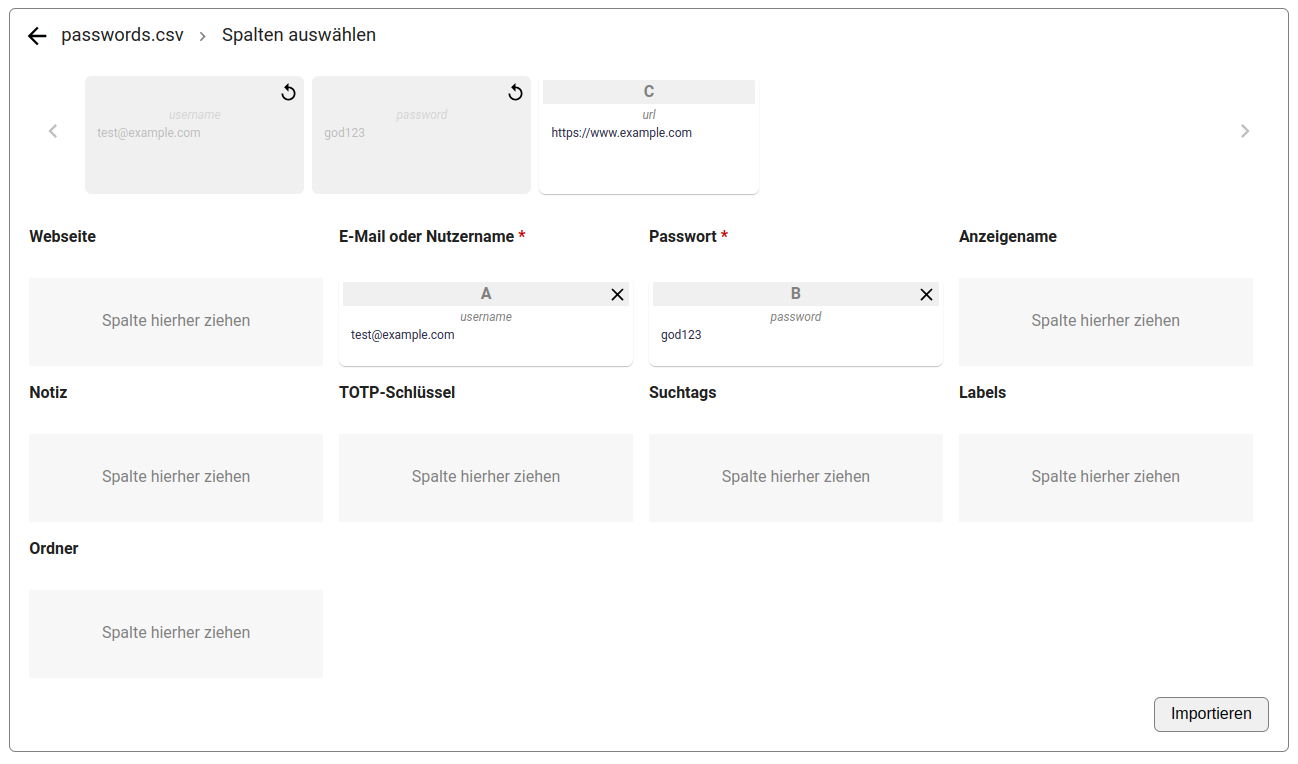
  1. When importing from generic formats, the columns can be assigned to the corresponding fields in heylogin.
    1. Image without caption
💡
If you have any problems, please contact heylogin support
Excel
Export

Powered by Notaku
Helpful?
Privacy
Site Notice
Share
Content
CSV
Prepare a CSV file
Import the file into heylogin